

Understanding DHCP in Modern Data Centers: From DORA to SARR and ToR Relays

Understanding DHCP in Modern Data Centers: From DORA to SARR and ToR Relays
Ever wonder what’s the first thing baremetal servers do when they start in datacenter? Yes, they look for hostname and ipaddress among many other things.
The Dynamic Host Configuration Protocol (DHCP) is a foundational networking protocol, silently ensuring that every device connecting to a network receives its crucial IP address and configuration. In the dynamic, scalable environment of modern data centers, understanding DHCP’s nuances – from its IPv4 (DORA) and IPv6 (SARR) flows to its integration with Top-of-Rack (ToR) switches and load balancers – is paramount.
The Core Function: Automating Network Configuration
At its heart, DHCP eliminates the need for manual IP address assignment. When a new server, virtual machine, or container spins up in a data center, it relies on DHCP to obtain:
An IP address (IPv4 or IPv6)
A subnet mask
A default gateway
DNS server addresses
Other critical network parameters eg. TFTP server address, lease time etc
This automation is vital for the rapid provisioning and de-provisioning of resources characteristic of cloud and data center operations.
Do server need OS to start first for dhcp client to request for IP?
When a machine is turned on and the BIOS/UEFI is configured to boot via PXE, the Network Interface Card (NIC) firmware or the system’s UEFI/BIOS firmware itself runs a small, built-in program. This program acts as a temporary DHCP client.
DHCPv4: The DORA Process (Discover, Offer, Request, Acknowledge)
The classic DHCP exchange for IPv4 clients is known by the acronym DORA:
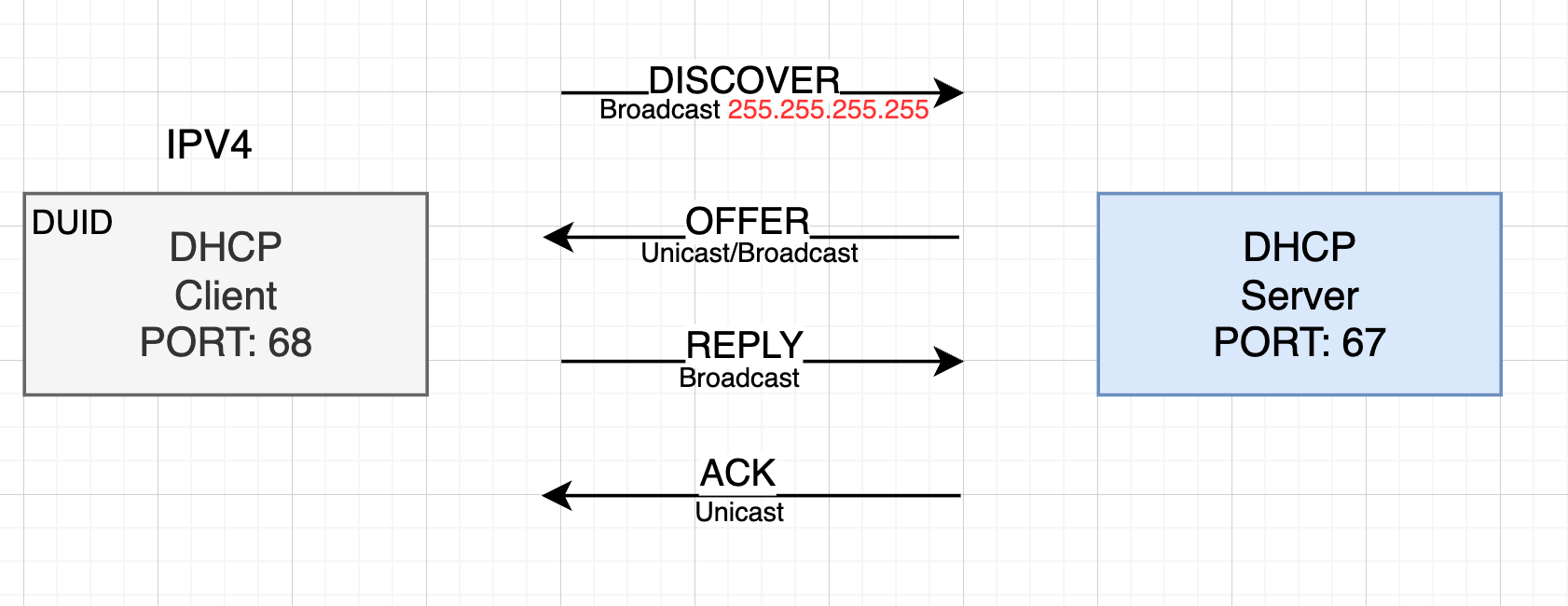
Discover (Client to Server): A client, lacking an IP address (source IP 0.0.0.0), sends a UDP broadcast packet to
255.255.255.255on destination port67. This message, theDHCPDISCOVER, seeks any available DHCP server on the local network segment.Offer (Server to Client): Any DHCP server receiving the
DHCPDISCOVERresponds with aDHCPOFFER. This unicast (or sometimes broadcast) UDP packet (from server port67to client port68) contains a proposed IP address, subnet mask, gateway, and a lease time.Request (Client to Server): The client, upon receiving one or more offers, selects one (often the first or one with a preferred server identifier) and sends a
DHCPREQUEST. This broadcast UDP packet (from client port68to server port67) explicitly requests the offered configuration. This broadcast ensures other servers know the offer was accepted and can withdraw their unused offers.Acknowledge (Server to Client): The selected DHCP server finalizes the transaction by sending a
DHCPACK(Acknowledgment) packet. This unicast UDP packet (from server port67to client port68) contains the confirmed IP address, lease duration, and all other configuration parameters. The client then configures its network interface with these settings.
DHCPv6: The SARR Process (Solicit, Advertise, Request, Reply)
With the increasing adoption of IPv6, DHCPv6 provides similar functionality with some key differences, primarily leveraging IPv6’s multicast capabilities:
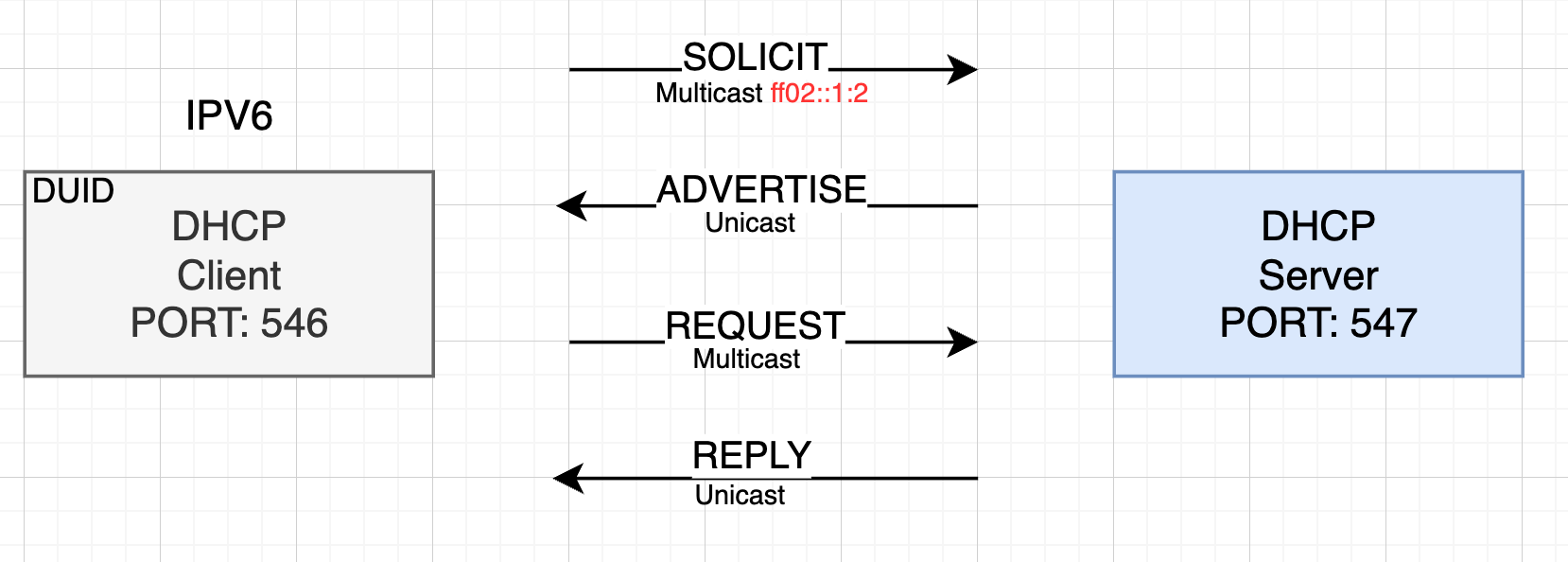
Solicit (Client to Server): A client, having a self-assigned link-local IPv6 address (e.g.,
fe80::...), sends aSOLICITmessage. This UDP multicast packet (from client port546to destinationff02::1:2- the All DHCP Relay Agents and Servers address, on port547) announces the client’s need for an IPv6 address and configuration. It includes the client’s DHCP Unique Identifier (DUID).Advertise (Server to Client): DHCPv6 servers that receive the
SOLICITmessage and are willing to provide service respond with anADVERTISEmessage. This unicast UDP packet (from server port547to client port546) contains the server’s DUID and an indication of the IPv6 addresses and options it can offer.Request (Client 1to Server): The client chooses a server (based on preference or other criteria) and sends a
REQUESTmessage. This multicast UDP packet (from client port546to server port547) explicitly asks the chosen server for the advertised configuration.Reply (Server to Client): The selected DHCPv6 server sends a
REPLYmessage. This unicast UDP packet (from server port547to client port546) contains the confirmed IPv6 address, lease lifetime, DNS server information, and all other requested configuration details.
DHCP in the Data Center: The Role of Top-of-Rack (ToR) Switches and Relays
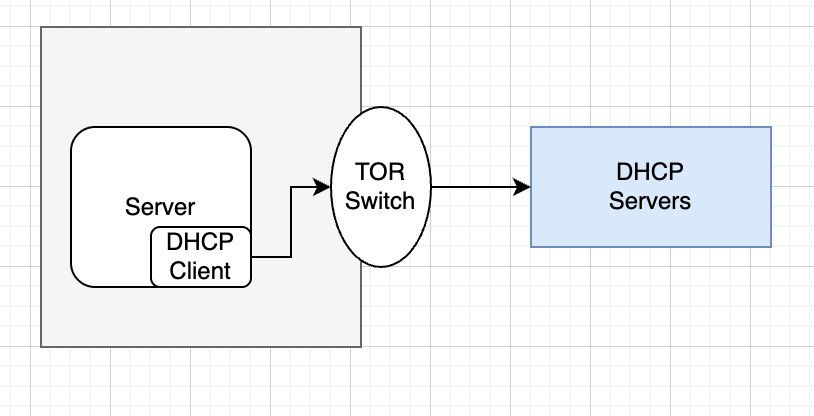
In large data centers, DHCP servers are typically centralized for easier management, security, and scalability. However, DHCP discovery messages (broadcasts in IPv4, multicasts in IPv6) are usually confined to the local subnet and do not cross Layer 3 boundaries (routers). This is where DHCP Relay Agents become essential, especially on Top-of-Rack (ToR) switches.
A ToR switch is the primary network device within a server rack, connecting all the servers in that rack to the data center’s core network. When a server within a rack powers on and needs an IP address:
Client Broadcast/Multicast: The server sends its initial
DHCPDISCOVER(IPv4) orSOLICIT(IPv6) message. This message reaches the ToR switch.ToR as Relay: The ToR switch, configured as a DHCP Relay Agent, intercepts this broadcast/multicast. It then repackages the request as a unicast packet and forwards it to the pre-configured IP address(es) of the centralized DHCP server(s). The relay agent includes its own IP address (
GIADDRin DHCPv4,link-addressin DHCPv6) in the packet, so the DHCP server knows which subnet the request originated from.Server Response: The DHCP server processes the request and sends a
DHCPOFFER/ADVERTISEback to the ToR relay agent (as a unicast packet).Relay to Client: The ToR relay agent then forwards this response back to the original client, typically by converting it back to a broadcast/unicast on the client’s local subnet.
This “DHCP relay on ToR” setup allows a few centralized DHCP servers to serve thousands of clients across numerous racks and subnets, significantly simplifying network design and management.
DHCP Load Balancing: Enhancing Scale and Resilience (e.g., dhcplb)
Even with DHCP relays, the centralized DHCP servers can become a bottleneck or a single point of failure in very large environments. Solutions like dhcplb (DHCP Load Balancer), developed by companies like Facebook/Meta, address this by:
Distributing Load:
dhcplbsits in front of a pool of DHCP servers, distributing incoming client requests across them.High Availability: It monitors the health of the back-end DHCP servers and can seamlessly redirect requests to healthy servers if one fails, ensuring uninterrupted service.
Session Persistence: Crucially,
dhcplbensures that all requests from a single client for a given DHCP session are directed to the same back-end DHCP server. This maintains the state required by the DHCP protocol (e.g., renewing a lease).