

Initrd vs Initramfs

What are initrd and initramfs?
First and foremost, these two are not the same by nature itself. They serve the same purpose, though: provide the kernel with the bare-minimum drivers to help locate and mount the root filesystem. However, the way they work is fundamentally different. They act as a temporary root filesystem, allowing the kernel to initialize essential hardware before the real root filesystem is available.

initrd (Initial RAM Disk): The Block Device Approach
This is an actual block device (typically formatted with ext2 or ext3) that is loaded into RAM by the bootloader (GRUB, iPXE, etc.). Think of it as a miniature disk image residing in memory.
Process:
The bootloader loads the kernel and mounts the initrd image into RAM.
The kernel treats the initrd as a block device and mounts it as the initial root filesystem.
The kernel executes the `
/linuxrc` script. This script is responsible for the heavy lifting of:Loading essential drivers (e.g., storage controllers, network cards).
Detecting and preparing the real root filesystem (which could be on a local hard drive, a network share via NFS, or an iSCSI target).
Mounting the real root filesystem.
Once the real root filesystem is mounted, the initrd is no longer needed and must be replaced.
The Challenge of Replacement:
If you need to replace one root filesystem with another, the command that traditionally comes to mind is pivot_root.
pivot_root: This command does replace the root filesystem. However, it effectively moves the entire old filesystem (the initrd) to a subdirectory under the new root. This means the old filesystem still exists in memory, making it inefficient and potentially problematic.
Inefficiency and Glitches:
The initrd remains in memory, consuming valuable resources. Furthermore, the process of switching root filesystems with pivot_root can sometimes be glitchy, leading to potential OS installation failures or unexpected behavior.
The Desire for a Clean Slate:
Wouldn’t it be better if the old filesystem could be completely removed and cleaned up? What command would you use to accomplish this? The answer lies in a more modern approach.
initramfs (Initial RAM Filesystem): The Archive Approach
In a newer, more efficient world, initramfs is used. initramfs is not a block device; rather, it’s a compressed archive (typically a cpio archive compressed with gzip, lzma, or other compression algorithms).
Process:
The bootloader loads the kernel and the initramfs archive into RAM.
The kernel extracts the initramfs archive directly into a RAM-based filesystem. This filesystem is typically tmpfs, a highly efficient RAM-based filesystem that dynamically allocates memory as needed.
The kernel executes the
/initscript (instead of /linuxrc). This script performs the same tasks as /linuxrc in the initrd approach:Loading essential drivers.
Detecting and preparing the real root filesystem.
Mounting the real root filesystem.
Crucially, the /
initscript uses switch_root (or in some cases, directly executes /sbin/init or /systemd on the real root filesystem) to transition to the real root.
The Power of switch_root:
switch_root: This command not only replaces the root filesystem but also removes the old filesystem (the initramfs) from memory, freeing up resources and ensuring a clean transition.
tmpfs: The Ideal RAM-Based Filesystem:
But if initramfs is just an archive, what filesystem does the kernel use to work with the extracted files? This is where
tmpfscomes in. tmpfs is a RAM-based filesystem that’s dynamically sized, meaning it only uses as much memory as needed. This makes it incredibly efficient for the initramfsenvironment.
Key Advantages of initramfs over initrd:
Efficiency: initramfs combined with tmpfs is more memory-efficient than initrd.
Simplicity: The boot process is cleaner and simpler, avoiding the complexities of pivot_root.
Flexibility: initramfs is easier to modify and customize.
Cleanliness: switch_root ensures that the old filesystem is completely removed, preventing potential conflicts.
Modernity: initramfs is the standard approach in modern Linux distributions.
In Summary:
While both initrd and initramfs serve the essential purpose of providing a temporary root filesystem during the early boot process, initramfs represents a significant improvement in terms of efficiency, simplicity, and flexibility. The use of a compressed archive, combined with the tmpfs filesystem and the switch_root command, makes initramfs the preferred method for modern Linux systems. initrd, while still functional, is largely considered a legacy approach.
Tips for remembering initrd vs initramfs and the flow
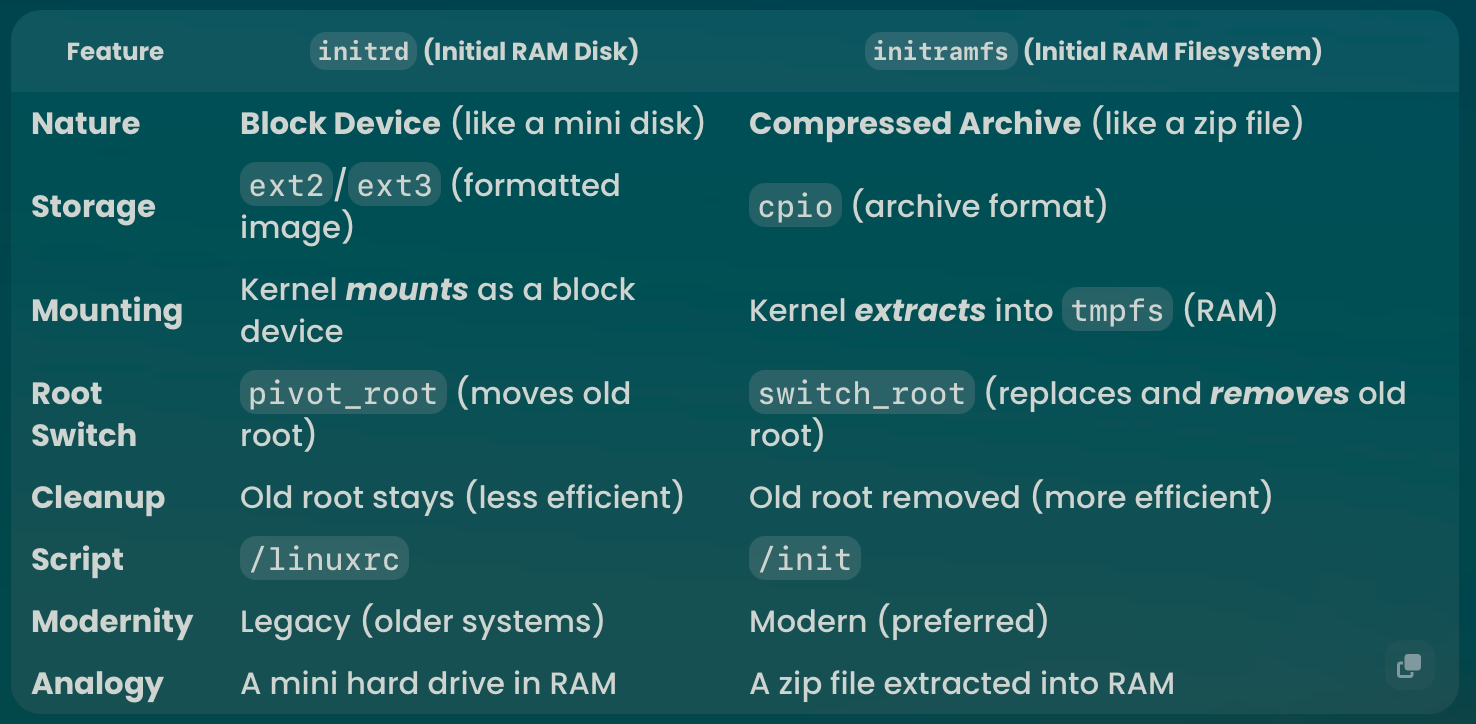
Easy-to-Remember Flow:
initrd:
Load & Mount: Bootloader loads initrd (the “mini disk”) and mounts it.
/linuxrc: Script runs to load drivers, find and mount the real root.
pivot_root: Tries to switch root, but the old root (the mini disk) sticks around.
initramfs:
Load & Extract: Bootloader loads initramfs (the “zip file”) and extracts it into tmpfs.
/init: Script runs to load drivers, find and mount the real root.
switch_root: Cleanly switches root, removing the temporary filesystem.
Key Commands:
pivot_root: (Associated with initrd - older, less clean) Replaces the root filesystem, but leaves the old one in place.
switch_root: (Associated with initramfs - newer, cleaner) Replaces the root filesystem and removes the old one.
Think of it this way:
initrd: Like moving into a new house but leaving all your old furniture in the basement.
initramfs: Like moving into a new house and completely clearing out the old one.
In short: initramfs is the cleaner, more efficient, and modern way to handle the initial root filesystem in Linux.